MCP access
Let an AI assistant read your boards and change your tasks through the Model Context Protocol. MCP access is an extension that comes with the server release.
MCP access is an extension. Your instance has it only if an administrator installed the
solo-mcppackage. See Themes and extensions.
What MCP access does
The Model Context Protocol (MCP) lets an AI assistant use tools from a different program. With MCP access, an assistant such as Claude Code or Cursor can:
- Read your projects, boards, epics and tasks.
- Create, change and move tasks, sub-tasks and epics.
The assistant acts as you. It uses a token that you generate.
- The assistant can reach only the projects that you are a member of.
- Your role in each project applies to the assistant.
- Each change goes into the audit log with your name and the line LLM via MCP.
Connect an assistant
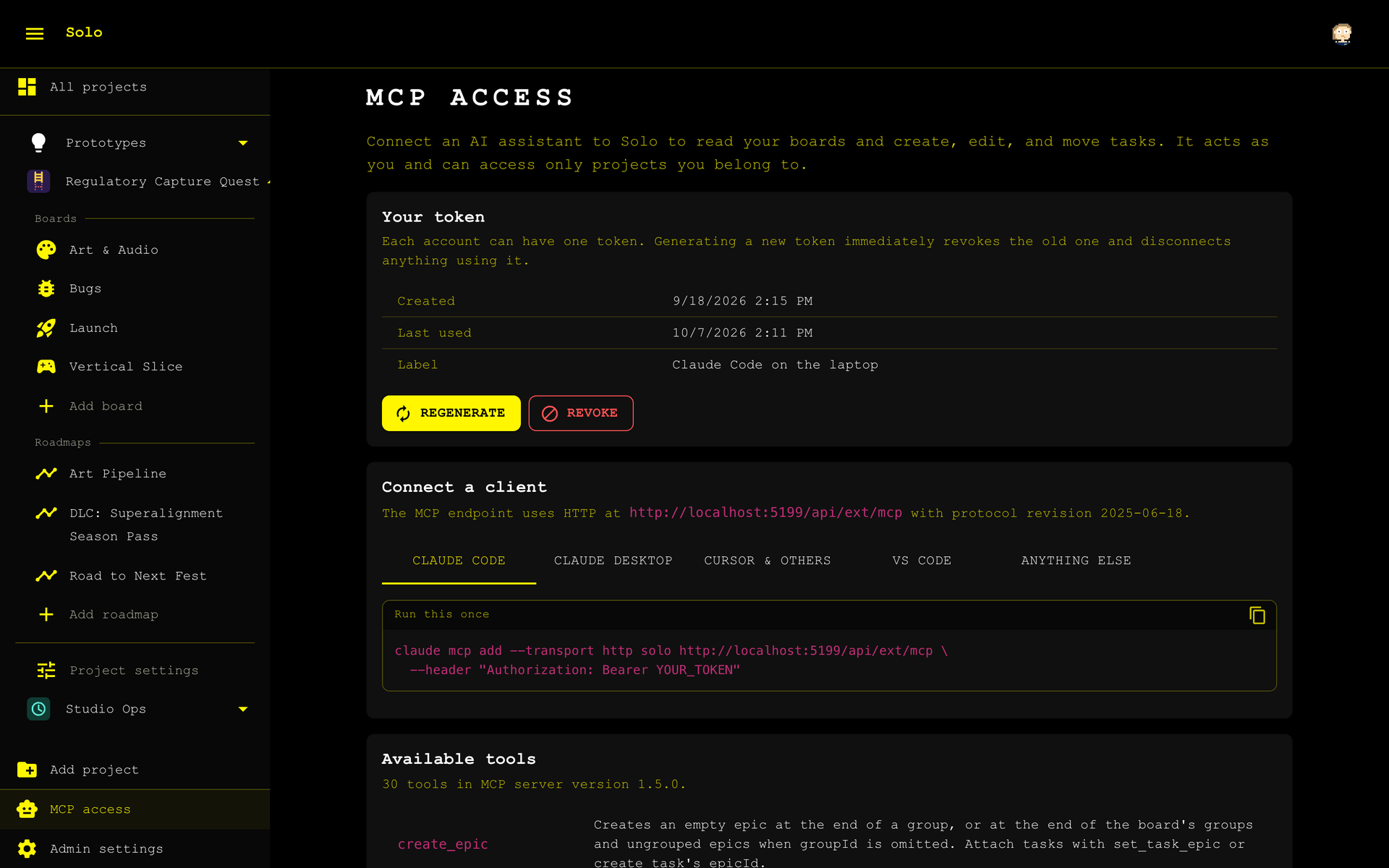
- Select MCP access at the bottom of the sidebar.
- Optional: enter a label for the token.
- Select Generate token.
- Copy the token immediately. Solo shows it one time only.
- Below Connect a client, select the tab for your assistant.
- Copy the command or the configuration from the tab into your assistant.
The Available tools table on the same page lists each tool that the assistant gets.
Keep the token secret. A person who has the token can act as you in Solo.
Manage your token
You have one active token at a time.
- Regenerate makes a new token. The old token stops working immediately.
- Revoke stops the token. The assistant then has no access.
If you lose the token, regenerate it. Solo keeps only a hash of the token, so nobody can read the token again.
Mark a task for an LLM
A task drawer can show the checkbox Work for an LLM. Solo shows it when one assignee or more has an active MCP token.
The checkbox is a mark only. It does not start an assistant and it does not change the task. An assistant can ask for the list of marked tasks on a board.
A member with the Read/write role can change the checkbox. A member with the Read only role can see it.
For a super admin
A super admin sees an All tokens section on the MCP access page. It shows the owner of each token, the dates of the token, and the requests of the last 24 hours.
- The revoke button on a row stops the token of one person.
- Revoke all stops each token on the instance. Solo asks you to type a phrase to confirm.
Sign out everywhere in the Admin settings also revokes the MCP token of that person.
Connection details
Use these values for a client that has no tab on the page.
| Value | Content |
|---|---|
| Address | https://<your instance>/api/ext/mcp |
| Transport | Streamable HTTP |
| Header | Authorization: Bearer <your token> |
A token starts with solomcp_.