Import and export design docs
Move notes and images between an Obsidian vault and Solo.
Import an Obsidian vault
Only a super admin with project membership can use the import dialog. Import is available only during design doc creation. The UI does not import into an existing vault.
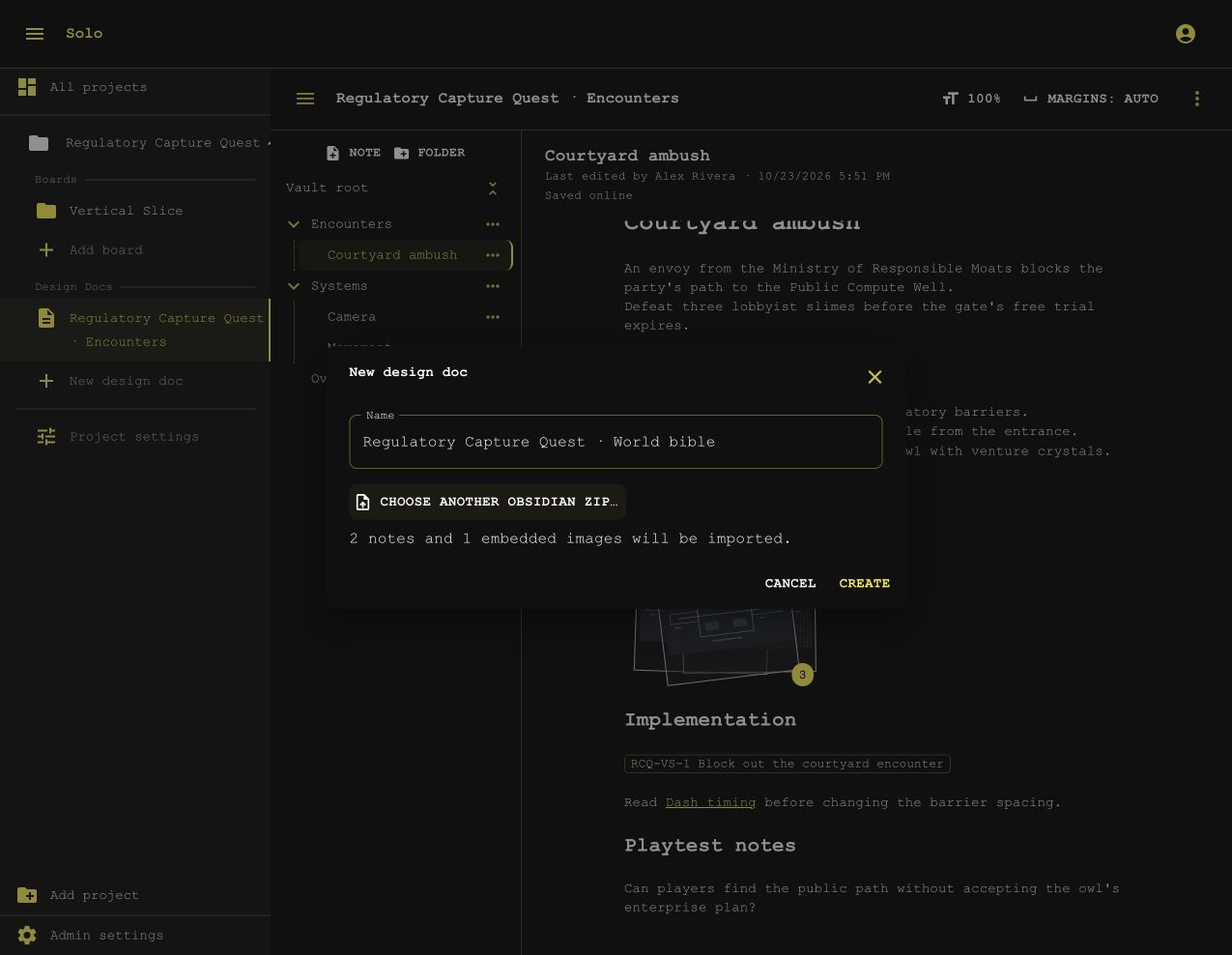
- Create a ZIP that contains your Markdown notes and their embedded images.
- Select New design doc in Solo.
- Enter a name.
- Select Import an Obsidian vault (.zip)….
- Select the ZIP.
- Review the note count, image count, and skipped files.
- Select Create.
Solo preserves UTF-8 Markdown, folders, front matter, and line endings. Wiki links can refer to other notes and headings within the imported vault. Import does not execute Obsidian plugins or evaluate their syntax.
Supported image formats are PNG, JPEG, WebP, and GIF.
Solo imports images that the notes embed.
It reports unsupported content and images that no imported note uses.
It silently ignores common metadata, including .obsidian, .DS_Store, __MACOSX, and source-control directories.
Solo skips videos and shows a warning. Their Markdown references remain in the notes, but Solo does not import the video files or play them. Obsidian Canvas and Excalidraw content are also unsupported.
During import, select Cancel to stop the remaining transfers. Solo keeps the created vault and content already imported. Select Open design doc to review that content. If an import fails, review its completed content before you retry in another new vault.
Import limits
| Content | Limit |
|---|---|
| Compressed ZIP | 100 MB |
| Expanded import | 256 MB |
| One Markdown note | 1 MB |
| One source image before conversion | 25 MB |
| Stored image | 10 MB and 2560 pixels on its longest side |
Solo resizes oversized raster images when it can preserve their format. It skips oversized animated GIFs rather than flattening their animation. Divide a large vault into smaller ZIP files before importing it.
Export a vault
Project members can export open or closed vaults.
- Open the design doc.
- Open Design doc actions, the ⋮ menu in the vault header.
- Select Export zip.
The ZIP contains the current Markdown notes, their folders, and stored images. Solo renders sketches as PNG files and changes their references in the exported copy. The editable sketches and original notes stay in Solo. Export stops if its uncompressed output exceeds 512 MB.
Storage and backups
The hierarchy is a database model. Solo does not edit Markdown files on disk.
The extension stores notes, collaborative updates, sketches, and image bytes in the ext_design_docs PostgreSQL schema.
A ZIP export is a portable copy, not a complete database backup. It does not preserve editable sketch history or restore the instance’s users and access rules. Back up PostgreSQL to preserve the full vault state. See Install for the deployment’s storage configuration.